
When you accept the invitation and launch the accessible workspace(in Which you are a member) in BacklinkCRM, you’ll land on this dashboard. It provides a high-level overview of your workspace data.
Here’s a breakdown of the dashboard elements:
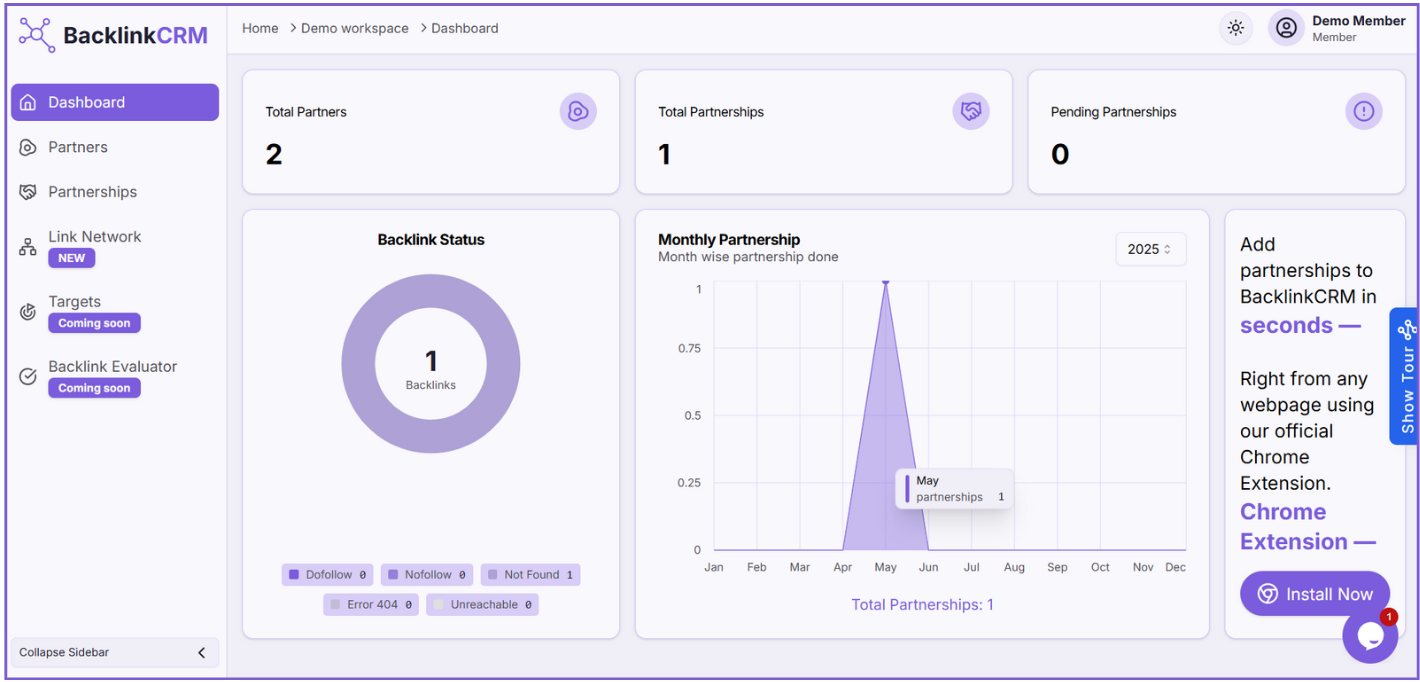
1. Total Partners: #
Displays the total number of partners in your workspace.
2. Total Partnerships: #
Displays the total number of partnerships created by this member.
3. Pending Partnerships: #
Displays the number of partnerships which have partnerships status pending.
4. Backlink Status: #
We can only see the backlinks status here.
5. Monthly Partnership: #
This graph shows the number of partnerships added each month.
6. Chrome Extension: #
BacklinkCRM Chrome Extension, allows you to quickly add partners and partnerships.
7. Show Tour: #
Click this button to start a walkthrough of the tool and get a basic understanding of how it works.
Note: Only the owner or admin can crawl for new backlinks to update the backlink status.