
The Partnerships section in BacklinkCRM is your central place to manage all your backlink partnerships. Get here by clicking “Partnerships” in the sidebar.
Here, you can:
- Manage your partnerships.
- Import and export multiple partnerships.
- Create, update, and delete partnerships.
- View detailed information for each partnership.
Here’s what you’ll find on the “All Partnerships” page, based on the numbered points in the image:
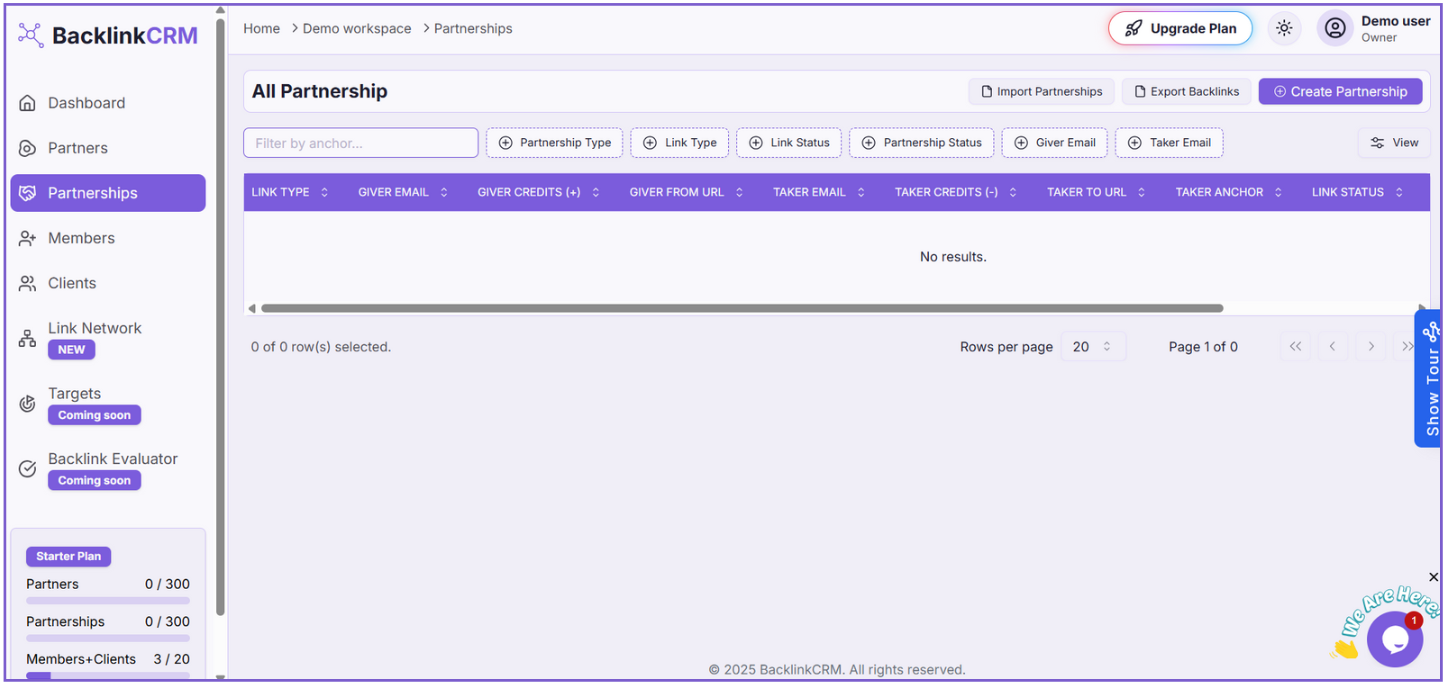
- Filter by Anchor: Use this to filter the partnerships by backlink anchor text.
- Import Partnerships: Click here to import partnerships from an Excel (.xlsx) file.
- Export Partnerships: Click the “Export Backlinks” button to download an Excel (.xlsx) file of all your partnership data.
- Create Partnership: Click this button to go to the “Create Partnership” page and add a new partnership.
- View: Use this option to see more detailed information about partnerships.
- Table Headers: These are the headers for the columns in the partnerships table.
- Partnerships Table: This is where your list of partnerships will appear.
- Pagination and Rows per page: Use these to navigate through the pages of your partnerships and control how many are shown at once.
- Pagination Controls: Use these controls to move between pages of the partnerships list, including going to the first, previous, next, or last page.